disdex
discord server index

Discord Badge Generator

A member count badge or a growth chart for any Discord server, ready to paste into a README or a website.

Badges for 𝘽𝙧𝙤𝙨𝙡𝙞

Member count

𝘽𝙧𝙤𝙨𝙡𝙞 on Discord
Markdown[![𝘽𝙧𝙤𝙨𝙡𝙞 on Discord](https://disdex.io/badge/1117432012916146196.svg)](https://disdex.io/server/1117432012916146196)
HTML<a href="https://disdex.io/server/1117432012916146196"><img src="https://disdex.io/badge/1117432012916146196.svg" alt="𝘽𝙧𝙤𝙨𝙡𝙞 on Discord"></a>

Online now

𝘽𝙧𝙤𝙨𝙡𝙞 on Discord
Markdown[![𝘽𝙧𝙤𝙨𝙡𝙞 on Discord](https://disdex.io/badge/1117432012916146196.svg?show=online)](https://disdex.io/server/1117432012916146196)
HTML<a href="https://disdex.io/server/1117432012916146196"><img src="https://disdex.io/badge/1117432012916146196.svg?show=online" alt="𝘽𝙧𝙤𝙨𝙡𝙞 on Discord"></a>

Members and online

𝘽𝙧𝙤𝙨𝙡𝙞 on Discord
Markdown[![𝘽𝙧𝙤𝙨𝙡𝙞 on Discord](https://disdex.io/badge/1117432012916146196.svg?show=both)](https://disdex.io/server/1117432012916146196)
HTML<a href="https://disdex.io/server/1117432012916146196"><img src="https://disdex.io/badge/1117432012916146196.svg?show=both" alt="𝘽𝙧𝙤𝙨𝙡𝙞 on Discord"></a>

With the server's name

𝘽𝙧𝙤𝙨𝙡𝙞 on Discord
Markdown[![𝘽𝙧𝙤𝙨𝙡𝙞 on Discord](https://disdex.io/badge/1117432012916146196.svg?label=name)](https://disdex.io/server/1117432012916146196)
HTML<a href="https://disdex.io/server/1117432012916146196"><img src="https://disdex.io/badge/1117432012916146196.svg?label=name" alt="𝘽𝙧𝙤𝙨𝙡𝙞 on Discord"></a>

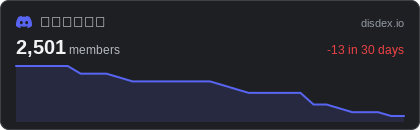
Growth over 30 days

𝘽𝙧𝙤𝙨𝙡𝙞 on Discord
Markdown[![𝘽𝙧𝙤𝙨𝙡𝙞 on Discord](https://disdex.io/badge/1117432012916146196/growth.svg)](https://disdex.io/server/1117432012916146196)
HTML<a href="https://disdex.io/server/1117432012916146196"><img src="https://disdex.io/badge/1117432012916146196/growth.svg" alt="𝘽𝙧𝙤𝙨𝙡𝙞 on Discord"></a>

The numbers update on their own. GitHub and other sites keep their own copy of an image for a while, so a change can take an hour to show there.

A Discord badge with nothing to set up

Most Discord badges read the server's widget, so they only work after an admin turns the widget on in the server's settings, and they only show who is online. These badges work for any server listed on disdex, with no setting, no bot and no login, and they show the member count too.

Where it works

The badge is a plain image, so it works anywhere an image does: a GitHub README, a website, a forum signature, a wiki. Copy the Markdown for GitHub and most wikis, or the HTML for a website. The image links to the server's page here, where visitors find a working invite.

The growth chart

disdex checks servers again and again and keeps the history, so it can draw how a server's member count moved over the last 30 days. Discord itself keeps no such history.

My server is not listed

Paste one of its invite links into the box at the top of any disdex page. The server's page and its badges appear once the invite has been checked, usually within a minute.